
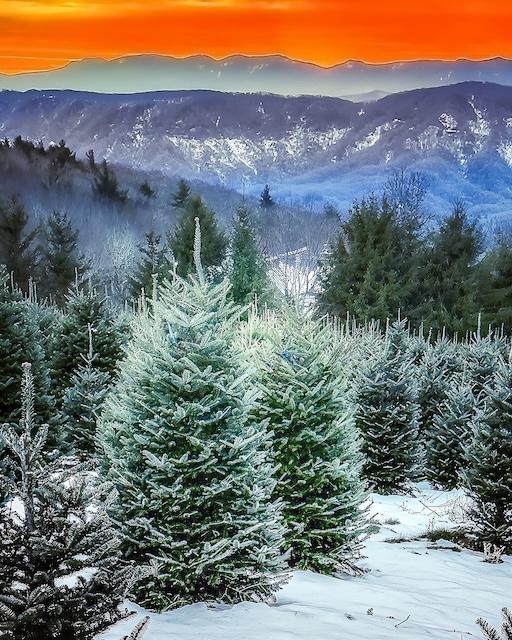
Take a look at Badger’s popular photo of a stunning view of a snowy sunset in the High Country of North Carolina – those frosted Fraser fir trees in the foreground, the layered blue-tinted west wall of Linville Gorge in the near background, and the distant Black Mountains about 20 miles away fading into the horizon, all under an intense orange sky casting a warm glow over everything. It’s like a holiday card come to life, isn’t it?
But as the photographer who captured this image recently on a wintry December evening, I can tell you that getting a shot like this involves more than just pointing and clicking. Winter photography, especially in snowy conditions, comes with unique circumstances that can frustrate even casual shooters using their phones.
The following is the Badger breakdown of these challenges, and I’ll share how I handle them to create images that capture the magic without looking washed out or unnatural.
One major peculiarity is how snow tricks your camera—or phone—into making the photo too dark. Snow is so bright and shiny that it reflects tons of light, confusing the device into thinking everything is already well-lit. This can turn your beautiful white snow into a dull gray mess. To fix it, I brighten things up a bit in the settings or take a few extra shots with different brightness levels and combine or compare them later. For this High Country image, that’s how I kept the snow looking fresh and crisp while holding onto the sunset’s warm colors by balancing the bright areas with the darker shadows.
The cold weather itself makes winter shoots feel like a real adventure. Batteries drain super fast in freezing temps, so I keep my camera batteries warm in my pocket (or elsewhere – that’s a story for another time). For the phone, I make sure it’s charged and bring a power pack or two with me. Your lenses can fog up from the temperature changes, and it’s tough to tap buttons with gloves on. If it’s windy or snowing hard, flakes can blur the picture or make focusing tricky. For this photo, I visited a property adjacent to the east side of Linville Gorge, dealing with slippery paths and racing against the short daylight to catch that perfect sunset moment before it vanished.
Composition in snowy scenes is another odd challenge because the white blanket can make everything look flat and boring, with no clear standout features. To avoid that, I look for interesting elements like these rows of evergreen trees to draw your eye in, then let the distant mountains add depth. The mix of cool blues and hot orange sky here creates a nice contrast that makes the photo exciting. But in all that whiteness, your phone or camera might have trouble focusing automatically, so a steady hand or manual intervention helps to keep the image sharp from front to back.
Finally, touching up these photos afterward requires gentle digital manipulation to keep the scene looking real. Snow’s soft details, like the frost on these fir branches, can disappear if you edit too heavily, or the colors might shift in weird ways – like picking up too much blue from the sky. I use simple apps like those on my iPhone (recently updated) or Lightroom to edit RAW camera images.
This High Country sunset got just a light edit from me to highlight the frost without making it fake. If you’re inspired to snap your own winter pics with your phone, try bumping up the brightness a little and editing softly.
My Christmas gift to you is not only beautiful but educational, and Badger says to take these suggestions and #optoutside for your own winter snapshots. Winter in the Southern Appalachians is a great time to hike and shoot.
Photograph © 2025 Thomas Mabry @honeybadgerimages – All Rights Reserved
Many of the HoneyBadgerImages are on display at instagram.com/honeybadgerimages.
Follow KnoxTNToday on Facebook and Instagram. Get all KnoxTNToday articles in one place with our Free Newsletter.

